The problem
I had a Jenkins pipeline that could build a Java application and push a Docker image. What it could not do was
deploy. The final stage was an empty block, and every release still ended with somebody opening a
terminal, editing an image tag into a Kubernetes manifest by hand, and running kubectl apply.
That last manual step is where the real risk lives. A hand-typed tag can point at an image that was never built by that pipeline run. A version bump can get committed for a build that failed. The goal here was to close the loop: one trigger, one artifact, one deployment, and no human editing YAML in between.
How the pipeline works
The ordering is the design. Each stage is a checkpoint that makes the next one safe to run.
pom.xml, bumps it with the Maven Build Helper plugin, and exports an IMAGE_NAME that combines the version with the Jenkins build number (for example 1.1.12-6). Every later stage references that one variable.mvn clean package compiles the Java source into a jar. The Dockerfile expects that jar to exist — if this stage is skipped, the image build fails outright rather than shipping something stale.$IMAGE_NAME, authenticates against the registry, and pushes. The image now exists where the cluster can pull it.envsubst to substitute $IMAGE_NAME and $APP_NAME into the Kubernetes manifests, and applies them. This is the stage that used to be empty.pom.xml back to GitLab so the next run starts from the incremented version. It runs last on purpose: a failed deploy must never leave a committed version bump behind it.The decision that mattered: templating the manifests
Kubernetes manifests are static YAML, but the image tag changes on every single run. There were three reasonable ways to
inject it — Helm charts, the Kubernetes Jenkins plugin, or envsubst shelling out over a template file.
I chose envsubst. Helm brings a release lifecycle, a chart repository, and templating syntax
I did not need for one variable in one deployment. The plugin hides the substitution behind Jenkins-specific configuration
that would not survive a move off Jenkins. envsubst is a two-line shell step, it leaves the manifest readable as
ordinary YAML, and the same command runs identically on my laptop and on the build agent. When the project grows past a
handful of substitutions, Helm becomes the right answer — but adopting it on day one would have been complexity
bought on credit.
What actually broke
The pipeline logic was never the hard part. Five consecutive builds failed, and every one of them failed on a prerequisite rather than on the thing I had just written.
The agent could not find Docker, then could not reach the Docker socket, then could reach it but was denied permission.
Resolved by installing the client, mounting the host socket into the agent, and — the one that took longest — matching the agent user to the socket's group by numeric GID. Linux permissions compare numbers, not group names, so a group that looks correct by name can still be the wrong group.
The version-bump commit failed with no configured Git identity, then failed again on a push the credentials were not scoped to allow.
Resolved by setting the committer identity inside the pipeline and issuing a credential with write access to the repository, stored in Jenkins rather than in the Jenkinsfile.
Pending — and it was not the deploymentWith the pipeline finally green, the pods would not schedule. Nothing in the manifest was wrong.
The cause was the node. On EKS, the maximum number of pods per node is bound to the instance type, because each pod consumes an ENI-backed IP address. The cluster had run out of addressable slots, not CPU or memory. That is a networking constraint, and it is worth knowing before you provision a node group rather than after.
Moving the registry to AWS ECR
Once the loop worked against Docker Hub, I swapped the registry for AWS ECR to keep the images inside the same account and IAM boundary as the cluster. That meant creating the repository, issuing Jenkins credentials scoped to it, rewriting the push stage for the ECR registry URL, and creating a pull secret so the cluster itself could authenticate.
Registry migration is a good test of whether a pipeline is actually parameterised or just appears to be. This one changed in one stage and one secret.
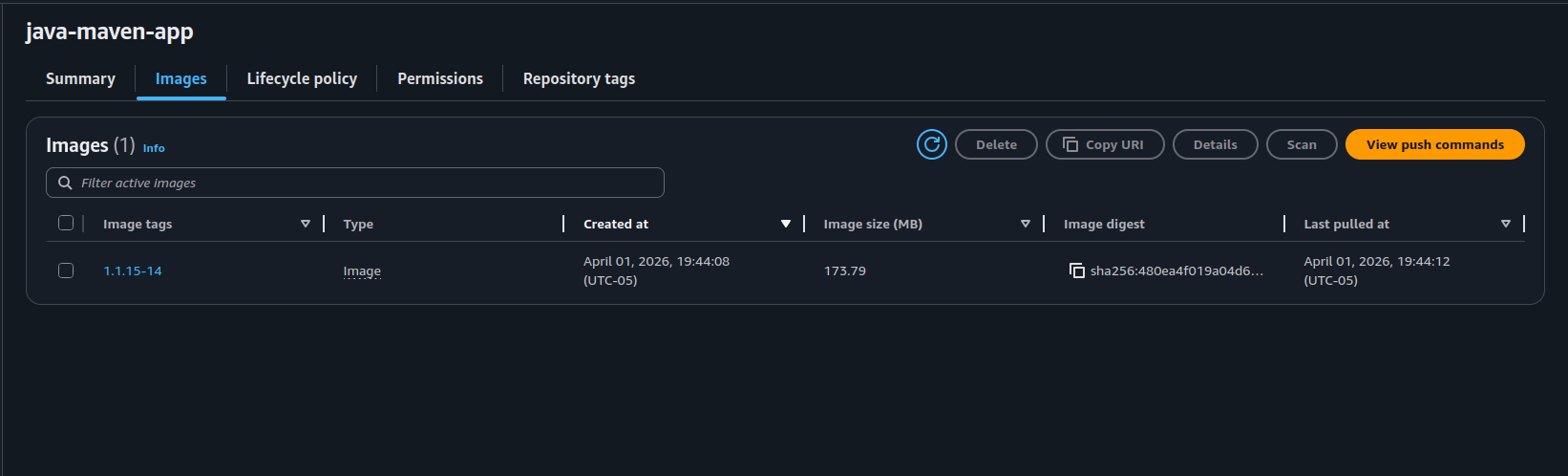
java-maven-app image in ECR, tagged with the version generated during that pipeline run — not by a person.Outcome
- Deployment is fully automated end to end. A commit produces a versioned artifact, a tagged image in ECR, and a running workload on EKS with no manual step in between.
- Every deployed image traces back to the run that built it. The tag is generated in stage one and carried through; nothing can be deployed that the pipeline did not produce.
- Failed builds leave no residue. Because the version commit runs last, a broken deploy does not advance the version in source control.
- The manifests stayed readable. They are still plain YAML that someone unfamiliar with the project can open and understand.
What I took from it
- Pipelines break on prerequisites, not logic. Every failure here was environment — a missing binary, a socket, a permission, a credential scope. Reading the actual error text, rather than assuming the last thing I wrote was at fault, was the skill that mattered.
- Choose the smallest tool that closes the requirement. Helm is not wrong; it was just larger than the problem. I would reach for it the moment the substitution count or the release lifecycle justified it.
- Infrastructure limits are often not the limit you assume. Pods pending looked like a resource problem and was an IP addressing problem. Knowing which layer you are actually constrained by is most of the diagnosis.